
PlayNest: MP3 Music
SmarTtDevMusic & Audio
4.211.00 Reviews
- Version
- 1.0.2
- Installs
- 1.00M
- Age Rating
- Everyone
Screenshots
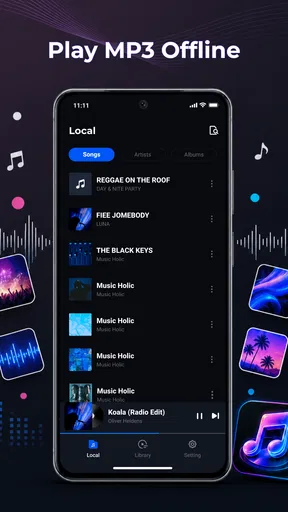
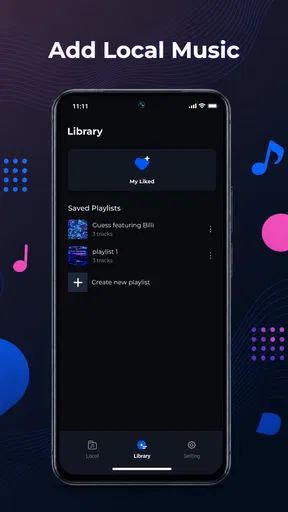
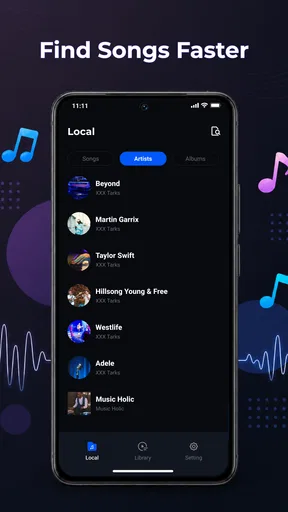
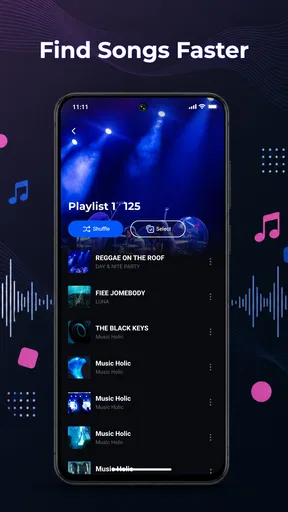
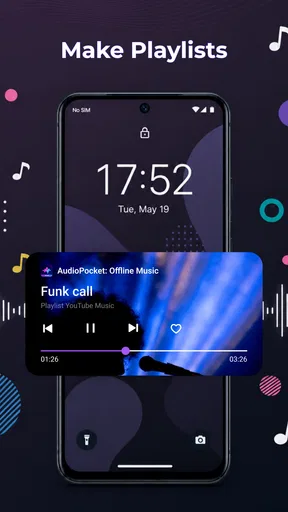
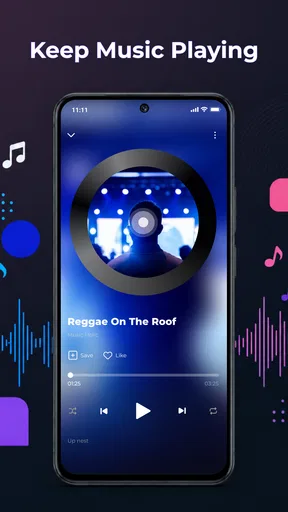
Our Review of PlayNest: MP3 Music
 Analysis by Appyee
I installed PlayNest: MP3 Music because I wanted a straightforward way to listen to music already stored on my device, without turning a simple listening session into a search through a streaming catalog. Developed by SmarTtDev, this free Music & Audio app focuses on local MP3 playback, folder browsing, playlists, and controls that remain useful while another app is open. That narrow purpose is its biggest strength: it feels aimed at people who already own their music files and want a practical player rather than another subscription service.
My starting point was a familiar one. I had several kinds of audio mixed together: albums copied to the phone, individual tracks received from elsewhere, and longer recordings arranged in folders. A streaming app is not always helpful in that situation because it may not show local files clearly, while a basic file manager makes listening awkward. PlayNest sits between those two experiences. It gives the music a dedicated place and lets me move from a folder or playlist to playback without constantly reopening the file browser.
From stored MP3 files to a usable listening routine
I find the useful test for a local player is not how quickly it opens, but how little effort it takes to go from a file you recognize to music that stays out of your way. This section looks at that handoff and the small organizational choices that make it smoother. From there, I’ll consider how the routine holds up when listening overlaps with the rest of the day.
Getting oriented without a streaming-style distraction
The first thing I noticed is that PlayNest is built around the music you already have. There is no need to begin by choosing an online service, building a library from a catalog, or deciding whether a monthly plan is worthwhile. The useful question is much simpler: where are my MP3 tracks, and how do I want to play them? For listeners with a carefully maintained collection, that directness is refreshing.
The folder-based approach is especially useful when your files are organized by artist, album, mood, project, or purpose. Instead of forcing every track into one large undifferentiated list, folders preserve the structure you created. I can imagine using one folder for commuting music, another for language practice, and separate folders for complete albums. That makes PlayNest more practical than a generic audio file opener when the collection has grown beyond a handful of songs.
There is also a useful distinction between folder browsing and playlists. Folders reflect how files are stored, while playlists reflect how I want to listen right now. Keeping both paths available means I do not have to reorganize the physical files merely to create a temporary listening queue. That small separation is one of the more valuable design choices for anyone who regularly changes listening habits.
Building a session instead of repeatedly opening files
My preferred workflow is to start with a folder when I want an album-like experience, then use a playlist when I want a repeatable selection. For example, I might gather a few tracks for a morning walk without moving them from their original locations. The playlist becomes the listening plan, while the folders remain the filing system. This avoids the common problem of duplicating audio files just because a new collection has been created.
A playlist is also helpful for handoffs between activities. I can prepare a selection before leaving home, begin playback, and then switch to another task without returning to the music list after every track. That matters more than it sounds. The value of a local player is not only whether it starts a song; it is whether it lets the listening session continue with minimal attention.
One practical tip is to keep folder names purposeful before importing or browsing them. A clear structure such as artist and album folders is easier to navigate than a download directory filled with vague filenames. PlayNest can make an existing collection easier to use, but it cannot compensate for badly named or scattered files. The app is strongest when the user takes a few minutes to create a sensible file structure.
Background controls during an ordinary day
The background controls are important because music rarely stays the only thing on screen. I tested the idea around a normal routine: start a selection, leave the player, read messages, open another app, and return later. A dedicated player becomes worthwhile when the audio survives that handoff without making me search for the original file again. PlayNest is designed for that kind of uninterrupted use.
This is where it differs from opening an MP3 directly from a file manager. A file manager is useful for locating content, but it is not usually the best place to manage an extended listening session. PlayNest gives the playback task its own home, while background controls reduce the need to keep the app visible. For walking, studying, cooking, or working at a desk, that is a more natural arrangement.
The same workflow suits audio that is not conventional music. Someone could arrange spoken recordings, personal mixes, or offline practice material into folders and playlists, provided the files are MP3 tracks. That makes the app more flexible than its name might suggest, although people who need a specialized audiobook or podcast system may still prefer an app designed around chapters, subscriptions, or episode progress.
Where the handoffs become useful
The best local-player workflow has several handoffs: storage to library, library to playlist, playlist to background playback, and background playback back to the listener. PlayNest’s feature set addresses each of those stages at a basic, understandable level. I can begin with a file location, shape it into a listening queue, leave the app, and return to the same activity later.
That sequence is also why I would recommend it to someone who feels overwhelmed by streaming apps. There are fewer decisions. You do not have to compare editions, follow artists, manage recommendations, or wonder whether a track is available in your region. You bring the music, and the app handles the local playback workflow.
There is a trade-off, though. A streaming service usually handles discovery, synchronized libraries, editorial playlists, and access across several devices. PlayNest does not replace those experiences; it serves a different starting condition. If your music life begins with finding new artists rather than managing owned files, a streaming app will probably feel more rewarding. If your music life begins with a folder on your phone, PlayNest is the more direct tool.
A realistic everyday example
Imagine preparing for a train journey with a limited or unreliable connection. Before leaving, I would place the desired MP3 tracks in a clearly named folder, open that folder in PlayNest, and create a playlist if I wanted a particular order. Once playback begins, I can put the phone away and use background controls while reading or working. If I later want a different mood, I can switch to another prepared playlist instead of searching through individual files.
The important outcome is not a flashy feature but reduced friction. The music is ready before the journey, the listening order is intentional, and the session does not depend on a live catalog. For people who travel, keep personal recordings, or prefer to own their collection, that workflow is more dependable than relying on a service designed primarily for online access.
What the current release means in practice
PlayNest is currently at version 1.0.2 and requires Android 8.0 or later. That makes compatibility worth checking before installing, especially if you use an older phone or a device that has not been updated for some time. On a supported Android device, the app’s modest scope should be easy to understand: it is a local MP3 player, not a full music-management ecosystem.
It is free to use, and its content rating is Everyone, so the basic proposition is easy to evaluate without committing money first. The app has reached over ten thousand installs and holds a 5.0 average from 23 ratings, with one written review shown alongside that score. Those figures suggest a small but very positive early audience; I would treat them as encouraging rather than as proof that every device and music library will behave identically.
The release also feels like a reason to keep expectations realistic. A focused version can be pleasant because it avoids unnecessary layers, but newer or smaller apps may not cover every unusual library arrangement. I would install it with a specific need in mind—offline MP3 playback, folder access, playlists, or background listening—rather than expecting the breadth of a mature streaming platform.
Small habits that improve the experience
My first recommendation is to separate permanent organization from temporary listening. Keep artist and album folders stable, then use playlists for occasions such as exercise, travel, or concentration. This prevents a temporary mood from disrupting the underlying collection and makes it easier to return to an album later.
My second recommendation is to prepare before going offline. PlayNest is intended for tracks stored on the device, but the smoothest experience still depends on having the files in place and easy to identify. Moving files around at the last minute creates unnecessary confusion, particularly when several versions share similar names.
A third useful habit is to treat background playback as a handoff tool, not merely a convenience. Start the playlist before beginning an activity that will occupy your attention. That way, the player has already moved from setup to playback before you switch to maps, notes, reading, or another app. The fewer times you interrupt the session, the more valuable the simple design becomes.
Where the flow breaks down
The workflow is not ideal for everyone. The most obvious limitation is that PlayNest depends on your own MP3 collection. If your tracks are scattered across unsupported formats, cloud services, or streaming accounts, the app cannot become a universal library simply by installing it. Users who expect automatic access to a huge catalog should choose a streaming service instead.
There is also a difference between basic playlist handling and advanced music management. I would not choose PlayNest specifically for elaborate tagging, social sharing, synchronized libraries, or discovery tools. Those needs belong to broader music platforms. Here, the app’s value comes from keeping local playback uncomplicated, so adding too many expectations would make the comparison unfair.
Another possible friction point is the handoff between storage habits and listening habits. If your files have inconsistent names or are stored in many unrelated locations, browsing can take more effort than expected. The app can give those files a dedicated playback space, but the user still has to provide enough organization for folders and playlists to be useful. In my view, that is less a flaw than the natural cost of choosing local ownership over an automatically managed catalog.
People who want cloud synchronization should also think carefully before making PlayNest their only music solution. A local player is convenient on the device containing the files, but it does not offer the same automatic continuity as a service built around an account and remote library. For a single Android phone, that may be perfectly acceptable. For several devices, a streaming or synchronized music system may be a better fit.
Who I would recommend it to
I would recommend PlayNest to Android users who already keep MP3 music on their phone and want a cleaner daily listening routine. It is a good match for someone who values offline access, prefers folders to a giant catalog, and wants playlists without moving files into a separate service. It also makes sense for listeners who want to start music and then continue using the phone for other tasks.
I would be more cautious about recommending it to someone whose main pleasure comes from discovery, recommendations, or sharing. The app is not built around those activities. It is also not the first choice for a person who needs a specialized system for podcasts, audiobooks, or synchronized playback across multiple devices. In those cases, the usual category alternatives offer a more complete set of tools.
My final assessment after following the full workflow
PlayNest: MP3 Music succeeds by keeping the path from stored file to active listening short. I can begin with folders, shape a selection into playlists, hand playback over to the background, and return to the music without depending on an online catalog. That is a useful result for a specific kind of listener, and the free price makes it easy to try.
I would not describe it as a replacement for every music app. Its strengths are local files, simple organization, and practical background listening; its weaknesses appear when the user expects discovery, cloud continuity, or advanced library tools. For my own offline MP3 workflow, that focus is a benefit rather than a problem. If your music is already on an Android device running Android 8.0 or newer, PlayNest: MP3 Music is worth considering as a calm, purpose-built player—especially when the goal is to press play and get on with the rest of the day.
Privacy and Permissions
See what permissions an app requests and how it handles your data.
- Photos/Media/Files
- read the contents of your USB storage
- Storage
- read the contents of your USB storage
- Wi-Fi connection information
- view Wi-Fi connections
- Other
- view network connections, full network access, run at startup, control vibration, prevent device from sleeping, Google Play license check
Verdict
Strengths of PlayNest: MP3 Music
- Simple interface makes browsing and playing music quick.
- Supports offline playback for music stored on the device.
- Lightweight design uses limited storage and system resources.
- Playback controls are easy to access from the lock screen.
- Useful search tools help locate tracks in larger music libraries.
Limitations of PlayNest: MP3 Music
- Features may vary depending on the device and Android or iOS version.
- No guarantee that every audio format will play correctly.
- Library organization can feel limited for extensive collections.
- Background playback may affect battery life during long listening sessions.
- Users should review permissions and privacy details before importing music.
Similar Picks in This Category
View All
YouTube Music
Google LLC4.4

Samsung Music
Samsung Electronics Co., Ltd.3.8

Spotify: Music and Podcasts
Spotify AB4.3

JioSaavn - Music & Podcasts
Saavn Media Limited4.3

Lark Player:Music Player & MP3
Lark Player Studio - Music, MP3 & Video Player4.6

StarMaker: Sing Karaoke Songs
SKYWORK AI PTE. LTD.4.3
Frequently Asked Questions
What is PlayNest: MP3 Music, and what can I use it for?
PlayNest: MP3 Music is designed for listening to and organizing music files on a mobile device. It can be useful if you already have MP3 tracks stored locally and want a straightforward player for browsing songs, creating a personal listening queue, and enjoying music without relying entirely on online streaming. Its usefulness may depend on the audio formats and library features supported by your device version.
Does PlayNest: MP3 Music work without an internet connection?
A local MP3 player generally allows you to listen to songs saved on your phone without an active internet connection, which can be convenient while traveling or trying to reduce mobile data usage. However, any online features, advertisements, updates, account services, or content-discovery tools may require connectivity. Before downloading music, make sure you have the legal right to store and play those files.
Can I import my existing music library into PlayNest: MP3 Music?
The app is intended for playing music available on your device, but the exact import process can vary depending on your operating system, storage permissions, and the folders where your songs are saved. After installation, you may need to grant access to audio files or refresh the library manually. If tracks do not appear, check permissions, supported formats, and file locations.
Is PlayNest: MP3 Music free to download, and does it contain advertisements or purchases?
Availability, pricing, advertisements, and optional in-app purchases can differ by platform, country, and app version. Review the official Google Play or App Store listing before installing, paying particular attention to the developer’s notes and the purchase section. If the app is free, advertising may be used to support it, and premium options could remove ads or unlock additional playback features.
What permissions and privacy considerations should I check before installing it?
Because a music player needs to find and play audio stored on your device, it may request permission to access music or media files. You should verify that requested permissions match the app’s purpose and read the current privacy policy and store disclosures before proceeding. Avoid granting unrelated access, such as contacts or precise location, unless you understand why it is required.
